Which language should an AI agent use to search its memory: SQL or SPARQL?
Agent memory has been in fashion ever since agents appeared: it fights hallucinations and lets an LLM base its answers and decisions on your own information. Whether it is better to query that information from tables or from a graph is often decided on faith, after reading posts on the internet, without experiments and measurements of your own. In a study by Sequeda et al., GPT-4 answered questions over an enterprise SQL database correctly 16% of the time, and over a knowledge graph on top of the same database 54% of the time; the graph had an ontology with descriptions, while the SQL schema had only DDL: types and table and column names.
In my GraphRAG, the same information comes in two different forms. I extracted the data from the article “My PostgreSQL is faster than yours and has almost caught up with ClickHouse” into 34 PostgreSQL tables and turned them into a graph with an R2RML mapping. I connected both forms of knowledge to an agent over MCP and asked it 15 questions about the article: through SQL, through SPARQL, and with the agent free to choose between the two. In my experiment, the agent ran on three open-weight LLMs in turn. You can deploy them on your own infrastructure or laptop, and your data and questions won’t end up in the logs of a provider or of an aggregator between you and the LLM.
I also checked and calculated which is better for vector storage and semantic search: Lance or pgvector. I’ll share my measurements on current models of how best to search and where to store knowledge.
In the experiment, I caught DeepSeek coming up with an SQL injection to answer my question.
Two representations of the same data
With the help of LLMs, NLP, morphology and other scary words, my data turned into a graph representation and frames bound to RDF quads. The words of the text were broken down into entities, theses, measurements, replies, processes and so on. Each such fragment has its source in the original text, following the W3C Web Annotation standard. A derived layer of data was inferred on top of the neural network’s initial extraction. In total, that came to 10,154 quads in 37 graphs for a single article.
Then I laid it all out in database tables, which made it easier to take in by eye. A graph node became a table row, a column became its property, and a list became an array in the row. The comment on each column records which RDF predicate it holds. The R2RML mapping over these tables assembles the original graph again.
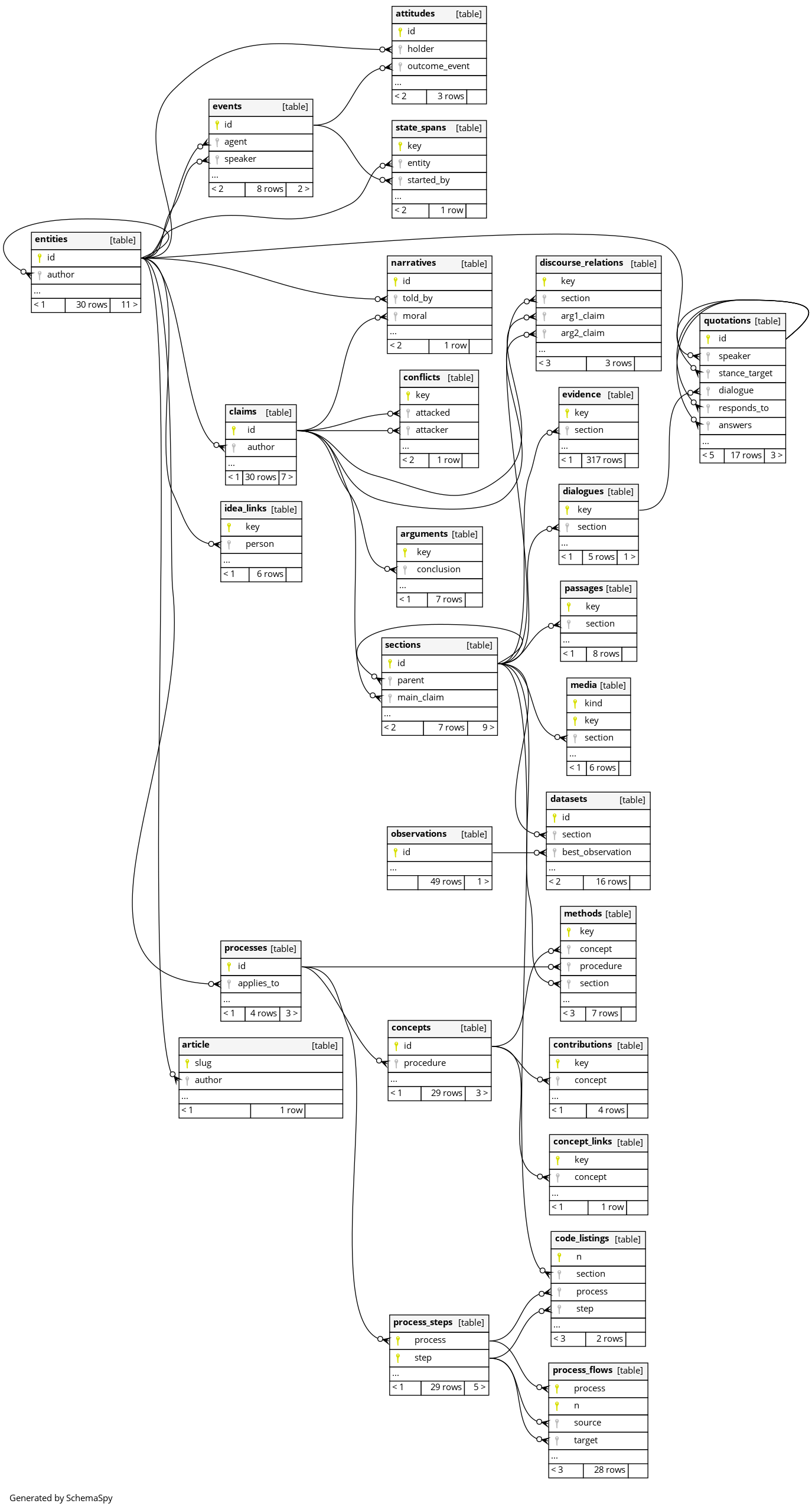
The memory also holds the processes from the article. The LLM recorded them as BPMN events, tasks and conditional branching. It stores 4 processes with 29 steps in process_steps/process_flows.




To check whether the queries would work in other languages, I made an English translation and ran the agents’ queries on that translation as well.
Agent memory
It is a Java program on langchain4j with a “model → tools → model” loop of no more than 16 LLM calls and no more than 12 memory queries. The memory is a separate process, an MCP server over the stdio protocol, that sends queries to PostgreSQL. Three tools are available in this loop:
- sql_query runs an SQL query in the DBMS as the agent_sql role.
- sparql_query runs a SPARQL query in the database as the agent_sparql role. The prefixes schema:, kgo: and oa: are already declared by default, as in many SPARQL endpoints.
- submit_answer, when the agent has decided to answer, hands over a quote with line numbers, the text of the answer, or “the memory doesn’t have this”.
Both roles in PostgreSQL only read data, with a 5-second timeout per query, and the result is cut to 200 rows so as not to overflow the model’s context. The description of the memory in the system prompt is the same under all conditions: tables and columns with their RDF predicates. That is 45–53 thousand characters, or 15–17 thousand tokens. The conditions differ only in the tools and a short hint for each of them.
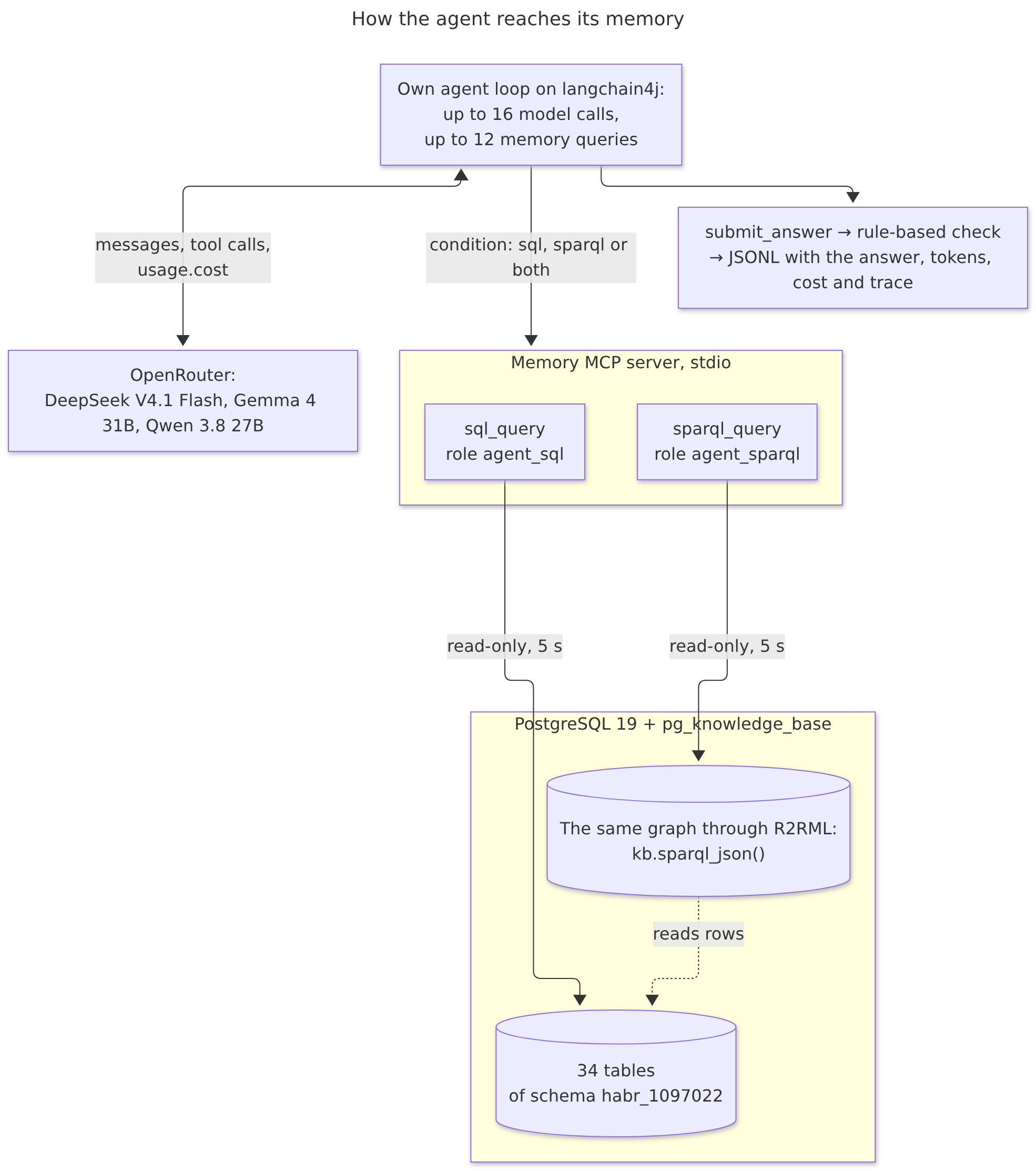
The model is called over the OpenAI protocol. For testing, I used OpenRouter, and so as not to land on heavily quantized or expensive runs of the models, I restricted the allowed providers and set a medium reasoning effort.
ChatModel model = OpenAiChatModel.builder()
        .baseUrl("https://openrouter.ai/api/v1")
        .apiKey(System.getenv("OPENROUTER_API_KEY"))
        .modelName(customModelName)
        .customParameters(Map.of(
                "provider", Map.of("order", List.of("deepinfra/fp8", "nebius/fp8"),
                        "allow_fallbacks", false, "require_parameters", true),
                "reasoning", Map.of("effort", "medium")))
        .returnThinking(true)
        .sendThinking(true, "reasoning")
        .build();
You can switch to your own vLLM/ollama/llama.cpp as well.
The agent connects to the memory over MCP, to a server in which the tools needed for the experiment are registered:
McpSyncServer server = McpServer.sync(new StdioServerTransportProvider(mapper))
        .serverInfo("jgraph-rag-memory", "0.1.0")
        .capabilities(McpSchema.ServerCapabilities.builder().tools(false).build())
        .toolCall(McpSchema.Tool.builder("sql_query", mapper, input).description(lang.sqlDescription()).build(),
                (exchange, request) -> memory.call(request, true))
        .toolCall(McpSchema.Tool.builder("sparql_query", mapper, input).description(lang.sparqlDescription()).build(),
                (exchange, request) -> memory.call(request, false))
        .build();


Properties p = new Properties();
p.setProperty("user", isSql ? "agent_sql" : "agent_sparql");
Connection c = DriverManager.getConnection(jdbcUrl, p);
c.setReadOnly(true);

try (PreparedStatement ps = c.prepareStatement("SELECT kb.sparql_json(?, ?)::text")) {
    ps.setString(1, withPrefixes(query));
    ps.setString(2, "https://example.org/story-kg/id/habr-1097022/");
    try (ResultSet rs = ps.executeQuery()) {
        rs.next();
        JsonNode result = json.readTree(rs.getString(1));
    }
}
The agent’s main loop gets its entire history and the list of available tools. If the agent called submit_answer, it has done its job and handed in the result. On an MCP error, the agent gets the text of that error; the model sees it and can rewrite the query correctly:
List<ChatMessage> messages = new ArrayList<>(List.of(SystemMessage.from(system), UserMessage.from(question)));
for (int turn = 0; turn < 16; turn++) {
    ChatResponse response = model.chat(ChatRequest.builder()
            .messages(messages).toolSpecifications(tools).build());
    AiMessage ai = response.aiMessage();
    messages.add(ai);
    for (ToolExecutionRequest call : ai.toolExecutionRequests()) {
        if (call.name().equals("submit_answer")) {
            return fromArguments(call.arguments());
        }
    }
    for (ToolExecutionRequest call : ai.toolExecutionRequests()) {
        String text;
        try {
            text = memory.executeTool(call).resultText();
        } catch (McpApplicationErrorException e) {
            text = e.getMessage();
        }
        messages.add(ToolExecutionResultMessage.from(call, text));
    }
}
OpenRouter returns the cost of every response and which provider served it, so the prices in this article’s tables are exact, not estimates from token counts and a price list.
Here is an example of the same memory query, “Which reply of the architect did the author answer with irony?”, in SQL and in SPARQL:
SELECT t.id, t.text
FROM quotations q JOIN quotations t ON t.id = q.stance_target
WHERE q.stance = 'irony';
SELECT DISTINCT ?t ?text WHERE {
  ?q kgo:stance <https://example.org/story-kg/concept/stance/irony> ;
     kgo:stanceTarget ?t .
  ?t schema:text ?text .
}
Both get back the reply from the original article: “So use a columnar store. PostgreSQL has a dozen of them.”
Experiment
To test the memory, I used 15 questions of seven types. Each has a gold answer and gold queries in SQL and SPARQL. Tests check that both gold queries give the gold answer on the databases in both languages.
| Type | Question | |
|---|---|---|
| F1 | Fact | How many ClickHouse submodules were needed to build MergeTree? |
| F2 | Fact | Which repository holds the source code of iheap? |
| R1 | Relation | Which DBMSs run in production at the author’s architect friend? |
| R2 | Relation | Which components does the vectorized executor pg_vexec integrate with? |
| A1 | Aggregate | How many replies did each side say in the dispute between the author and his architect friend? |
| A2 | Aggregate | Which section of the article has the most sets of measurements, and how many? |
| P1 | Path | Which numerical results of the article concern the developments that implement PostgreSQL’s table access method? |
| P2 | Path | Which claims support, directly or through a chain of arguments, the thesis that vectorization needs a data source that returns columns? Do not include the thesis itself. |
| D1 | Dispute | Which reply of the architect did the author answer with irony, and what did the architect advise in it? |
| D2 | Dispute | Which claim in the article is contested, by which claim, and is it refuted? |
| D3 | Dispute | How many dialogues of the dispute between the author and his architect friend did each side end with its own reply? |
| C1 | Quote | Where in the article does the architect friend say that reliability and speed are incompatible? Give the verbatim quote (in the article’s own words, Russian) and the line number. |
| C2 | Quote | Give the verbatim quote (in the article’s own words, Russian) in which the author names the share of function kernels in query execution time, and the line number. |
| U1 | No answer | Which processor does the laptop have on which the author compared PostgreSQL and ClickHouse? |
| U2 | No answer | Under which license is pg_vexec distributed? |
An answer is checked by rules, without an LLM judge. The set of nodes must match exactly, and an extra node counts as an error. Numbers are compared with the gold answer. A quote must appear verbatim on the named line of the article. For a question without an answer, only “the memory doesn’t have this” counts.
The conditions are sql, sparql and both; in the last one, the agent has both tools. Later I added a control condition.
I chose three open-weight models: DeepSeek V4.1 Flash, Gemma 4 31B and Qwen 3.8 27B. You can run them locally or deploy them on your own servers. An agent’s memory usually holds confidential information, and sending it to an external API is not a great idea. In the experiment, though, I called the models through OpenRouter: on my laptop, I couldn’t have run even the 27B model in 4-bit quantization in a reasonable time.
Model endpoints and prices
| Model | Endpoint | Input, $ per million tokens | Cached | Output |
|---|---|---|---|---|
| DeepSeek V4.1 Flash | deepinfra/fp8 | 0.098 | 0.003 | 0.294 |
| Gemma 4 31B | deepinfra/fp8 | 0.20 | no cache | 0.40 |
| Qwen 3.8 27B | deepinfra/bf16, fallback cerebras/fp16 | 0.15 (0.99) | 0.037 (0.99) | 1.875 (1.49) |
OpenRouter prices as of October 27, 2026. The agent took the cost of every call from OpenRouter’s response (usage.cost). When you run the models yourself, the price is set by the hardware, not by a rate card.
Each combination was repeated three times: 3 models × 3 conditions × 15 questions × 3 repeats, 405 runs for each language of the database. The runs went in parallel, 8 per model and condition, and all 405 took 10 minutes.
At first, the strict check caught the answer format more than anything. You ask what supports a thesis, and the model adds the thesis itself to the answer. You ask it to count each participant’s replies, and it counts by dialogues. So the answer got a context field, which isn’t checked but helps these models do better. The models also forgot to declare prefixes in SPARQL, so I added default prefixes. After all these fixes, a trial run gave 26 correct answers out of 27.
Results
Accuracy on the database with ru/en data:
| Model | RU sql | RU sparql | RU both | EN sql | EN sparql | EN both |
|---|---|---|---|---|---|---|
| DeepSeek V4.1 Flash | 45/45 | 45/45 | 45/45 | 45/45 | 45/45 | 45/45 |
| Gemma 4 31B | 42/45 | 44/45 | 43/45 | 45/45 | 44/45 | 44/45 |
| Qwen 3.8 27B | 45/45 | 44/45 | 45/45 | 43/45 | 45/45 | 43/45 |
| Total | 97.8% | 98.5% | 98.5% | 98.5% | 99.3% | 97.8% |
DeepSeek answered correctly all 270 times. Of the 13 errors of Gemma and Qwen, 12 fell on two questions, P1 and D3.
Cost and speed:
| Model | $ per run, RU / EN | $ per correct answer, RU | Median, s, RU / EN | Input tokens per run | Of them cached |
|---|---|---|---|---|---|
| DeepSeek | 0.0009 / 0.0009 | 0.0009 | 13 / 12 | 81K | 97% |
| Qwen | 0.0077 / 0.0104 | 0.0077 | 38 / 50 | 83K | 87% |
| Gemma | 0.0234 / 0.0225 | 0.0245 | 57 / 61 | 114K | 0% |
Per run, the agent calls the model 4–7 times on average, and each time sends the prompt of 15–17 thousand tokens anew. It helps if the provider caches the prompt. For example, DeepInfra caches DeepSeek and doesn’t cache Gemma, and with the same answers Gemma costs 25–27 times more.
SPARQL came out more expensive for me than SQL at the same accuracy. It has 2–3 times more database errors per call: 5.9% against 2.8% on the Russian database, and 7.3% against 2.5% on the English one. The cost of a run grows for all three models:
| Model | RU: sql → sparql, $ per run | EN: sql → sparql, $ per run |
|---|---|---|
| DeepSeek | 0.0008 → 0.0010 (+25%) | 0.0009 → 0.0010 (+11%) |
| Gemma | 0.0218 → 0.0234 (+7%) | 0.0212 → 0.0234 (+10%) |
| Qwen | 0.0063 → 0.0103 (+63%) | 0.0064 → 0.0157 (+145%) |
The agents correct themselves well: they read the error text and rewrite the query. Of the 134 runs where the database returned an error, 129 ended with a correct answer.
With both tools available, all three models started with SQL in every run. The order has nothing to do with it: in the control condition both_sparql_first, SPARQL came first everywhere: in the list of tools, in the prompt’s sentence about them and in the order of the hints. SQL still led in 131 runs out of 135.
| Condition | SQL first | SPARQL calls | Runs with SPARQL | Correct |
|---|---|---|---|---|
| both, RU | 135 of 135 | 17 of 691 | 12 | 133/135 |
| both, EN | 135 of 135 | 25 of 661 | 16 | 132/135 |
| both_sparql_first, RU | 131 of 135 | 23 of 660 | 16 | 131/135 |
The models reach for SPARQL when they don’t know where to look. Most often this happened on the question about pg_vexec’s license, which the article doesn’t mention. The schema doesn’t hint at which table would hold a license, while the graph lets you see all the properties of a node in one query: SELECT ?p ?o WHERE { <pg_vexec> ?p ?o }. That’s exactly how DeepSeek reasoned: “Search all columns for “лиценз” via SPARQL across literals” (“лиценз” is the stem of the Russian word for license).
All model calls went through OpenRouter: 1,389 runs cost $12.80. Of the $10.68 spent on the main runs, 70% went to Gemma, $7.46, and $0.28 to DeepSeek.
Cost and time by set of runs
| Set | Runs | Correct | Cost | Time |
|---|---|---|---|---|
| Pilots and debugging | 197 | - | $1.87 | - |
| Main, Russian database | 405 | 398 | $4.32 | 10 min |
Control both_sparql_first, Russian database |
135 | 131 | $1.52 | 8 min |
| Main, English database | 405 | 399 | $4.56 | 11 min |
| D3 reworded, English database | 27 | 27 | $0.28 | 3 min |
Article corpus, DeepSeek: first run, search as the agent_sql role |
112 | 95 of 108 | $0.12 | - |
| Article corpus, DeepSeek: main | 108 | 91 | $0.13 | 10 min |
| Total | 1,389 | $12.80 |
Most SPARQL errors are attempts to write it like SQL: LOWER() instead of LCASE(), SELECT COUNT(?d) without (COUNT(?d) AS ?n), a language tag on a variable (schema:name ?name@ru). In SQL, the models guess nonexistent columns (article.id instead of slug), glue together result sets with different numbers of columns with UNION, and compare an array with a string and get text[] = text.
On the English database, Qwen got D3 wrong three times. Twice, it understood the phrase “did each side end with its own reply” as “a side replied to itself”: for example, it credited the author only with the dialogue that the author both started and ended. The third time, the total in the text was right, but the answer’s nodes included rows for each dialogue. The Russian wording, “закончил своей репликой” (“ended with their own reply”), caused no such confusion. With the wording “did each side have the last word”, all 27 runs gave the right answer, and Qwen 9 out of 9 instead of 6 out of 9. I changed the question only after seeing the results, so the main table above keeps the old wording.
On the questions without an answer, all 126 runs under all conditions answered “the memory doesn’t have this”. No model made up the laptop’s processor or the license. But before that, the agent goes through the whole memory: a median of 12 memory queries against 3 on the other questions. On each database, 59 runs hit the limit of 12 queries, and all of them were on the two questions without an answer and on P1.
Plain RAG next to graph RAG
A graph and tables are good when the knowledge is already laid out in fields. More often, an agent’s memory is a pile of texts, and it’s easier to search them semantically, by embeddings.
I took the corpus from my search by meaning and fields right in the browser (in Russian): 13,275 Habr articles, almost all from 2023. For each one, an LLM extracted a summary, the meaning, topics, conclusions, genre, sentiment, and scores for demagoguery and advertising, and EmbeddingGemma 300M computed vectors of these texts: 147,432 vectors of dimension 768. All of this sits in parquet files on GitHub Pages.
I loaded it straight from that storage with DuckDB 2.0 through its JDBC driver. DuckDB read the parquet files directly over HTTPS, and COPY moved the data into PostgreSQL.
Loading code: DuckDB JDBC and COPY
try (Connection duck = DriverManager.getConnection("jdbc:duckdb:");
     ResultSet rs = duck.createStatement().executeQuery("""
             SELECT e.task_id, e.embedding_name, e.index, …, e.embedding_vector,
                    a.genre['primary_genre'] AS primary_genre, a.sentiment['polarity'] AS polarity, …
             FROM read_parquet(['…/data_0.parquet', …, '…/data_42.parquet']) e
             JOIN read_parquet('…/indexed_text.parquet') a USING (task_id)""")) {
    CopyIn in = pg.unwrap(PGConnection.class).getCopyAPI()
            .copyIn("COPY corpus.text_embeddings (…) FROM STDIN");
    // row by row: a vector as '[0.012,-0.034,…]', an array as '{"…","…"}'
}
Next to the embeddings, the tables hold the text they were computed from; for a topic, that is its name and description separated by a space. The agent’s queries are embedded by ollama with the same model, and for the corpus texts it gives the same vectors: a cosine above 0.999.
pgvector or Lance
There are at least two ways to store vectors in PostgreSQL. The first is an ordinary table and pgvector with an HNSW or IVFFlat index. I added the second recently: a USING lance table from pg_lance_tam. Its rows are in Lance’s columnar format, while PostgreSQL sees an ordinary table that supports transactions and replication. Such a table has indexes of its own: the vector indexes IVF_HNSW_SQ and IVF_PQ and the scalar BTREE and BITMAP.
The main difference of Lance is in filters. It applies a condition before the vector search if the condition is on columns of the same table. That’s why I repeated the article fields that searches are filtered by in every row with a vector: genre, sentiment, date, rating, publication type.
Lance query plan: filter before the search
Custom Scan (LanceScan) on text_embeddings (actual rows=10.00 loops=1)
  Filter: (polarity = 'negative'::text)
  Lance Filter: (`polarity` = 'negative')
  Lance Search: embedding_vector <=> $query, k=10, metric=cosine, prefilter
pgvector’s HNSW does the opposite: it takes the ef_search = 40 nearest neighbors from the graph and only then discards those that don’t match. With a filter on negative sentiment (4% of rows), only one of ten results is left.
pgvector query plan: filter after the search
Limit (actual rows=1.00 loops=1)
  ->  Index Scan using heap_hnsw on text_embeddings (actual rows=1.00 loops=1)
        Order By: (embedding_vector <=> $1)
        Filter: (polarity = 'negative'::text)
        Rows Removed by Filter: 39
I ran the comparison in a Testcontainers test on the same rows: 147,432 vectors in an ordinary table and in a Lance table, 20 queries, 11 filters, from “no filter” down to 252 rows. For each search, the test measures the time and the share of the exact ten nearest vectors found (recall@10).
| pgvector (heap) | Lance | |
|---|---|---|
| Rows with vectors | 677 MB | 453 MB |
| Vector index | HNSW: 17–31 s, 575 MB | IVF_HNSW_SQ, 16 partitions: 2.3–2.8 s, 136 MB |
| Index with coarse partitioning | IVFFlat, 150 lists: 2 s, 577 MB | IVF_PQ: 12 s, 9 MB |
The builds ran on 4 parallel workers with maintenance_work_mem of 2 GB, over three test runs.
Search for the ten nearest, median over 20 queries, and recall@10:
| No filter | summary (13K rows) | opinion (17K) | negative (6K) | fiction (252) | hub, an array (1.7K) | |
|---|---|---|---|---|---|---|
| pgvector HNSW | 0.3 ms · 0.95 | 0.3 ms · 0.27 | 0.3 ms · 0.31 | 0.3 ms · 0.09 | 0.7 ms · 1.00 | 0.3 ms · 0.11 |
| pgvector HNSW, iterative scan | 0.4 ms · 0.95 | 1.9 ms · 0.98 | 1.5 ms · 0.96 | 7.6 ms · 0.95 | 0.7 ms · 1.00 | 15.5 ms · 0.89 |
| Lance IVF_HNSW_SQ | 1.1 ms · 0.94 | 1.5 ms · 0.99 | 1.4 ms · 0.97 | 1.4 ms · 0.95 | 1.2 ms · 0.94 | 3.1 ms · 0.97 |
| Lance, all partitions, refine 10 | 2.5 ms · 1.00 | 3.7 ms · 1.00 | 4.8 ms · 1.00 | 3.8 ms · 1.00 | 2.3 ms · 1.00 | 4.3 ms · 1.00 |
In short:
- On queries without a filter, pgvector is faster. HNSW answers in 0.3 ms, Lance in 1–2.5 ms: preparing a Lance scan takes about a millisecond.
- With a filter, HNSW loses results. With a filter on the
summaryfield, it finds 27% of the exact neighbors, onnegative9%, and some queries return zero rows instead of ten. Raisingef_searchto 200 doesn’t save it either. The iterative scan from pgvector 0.8 helps: recall 0.89–0.98, but the search gets more expensive, 7–15 ms, and p95 reaches 25 ms. On the rarest filters (NSFW, fiction), the planner itself moves away from HNSW to a B-tree and an exact sort. - Lance always returns what was asked for. The filter is already applied, and the search runs only among the matching vectors. Probing all 16 partitions of the index and refining with full vectors (
lance.nprobes = 16,lance.refine_factor = 10), recall is 1.00 on every filter, including the hubs array, in 2–6 ms. The agent searches with these settings too. - The columnar format speeds up exact search as well. Without a vector index, on filters of medium selectivity (opinion, negative), Lance finds the ten nearest 2–2.5 times faster than exact search over heap: it reads only the columns it needs. Without a filter, it is 15% slower.
- At first, Lance didn’t filter on arrays. The condition
hubs @> ARRAY['PostgreSQL']stayed with PostgreSQL: Lance took the 100 nearest vectors, PostgreSQL filtered them, and recall fell to 0.16, sometimes to zero rows. I added to pg_lance_tam a translation of@>,&&and= ANYinto Lance’s functionsarray_has_all,array_has_anyandarray_has, which the LABEL_LIST index serves. Now this filter, too, is applied before the search: with the agent’s settings, recall is 1.00 in 4.3 ms, and exact search without a vector index takes 2.1 ms instead of 134.5. - A fixed
nprobes = 4is worse than the adaptive partition selection Lance does by default: recall 0.39–0.64, and with a rare filter sometimes fewer than ten rows. IVF_PQ compresses the index to 9 MB, but even with refinement gives a recall of only 0.39–0.87.
Lance wins on size too: the table is a third smaller, and the IVF_HNSW_SQ index is 4 times smaller than HNSW and builds 7–11 times faster.
For vector search over the corpus, the agent got the tool semantic_search(query, where, k). The MCP server computes the vector of query with the same embedding model through ollama and runs the query:
SELECT task_id, habr_id, title, embedding_name, index, text, embedding_vector <=> $1 AS distance
FROM text_embeddings
WHERE <the agent's condition>
ORDER BY embedding_vector <=> $1
LIMIT k;
The conditions: corpus_sql, only SQL over the corpus tables; vector, only search by meaning; vector_sql, both tools. There are 12 questions: five about articles by meaning (“In which article did the author build a pedal-powered cart to ride it along the old railway by Lake Baikal?”), three about the structure of the collection (counts, the most viewed article), two about a field of an article found by meaning, and two that the memory has no answer to. DeepSeek V4.1 Flash answered, with three repeats: 108 runs for $0.13.
| Questions | corpus_sql | vector | vector_sql |
|---|---|---|---|
| By meaning | 14/15 | 15/15 | 15/15 |
| About the structure of the collection | 6/9 | 4/9 | 8/9 |
| A field of an article found by meaning | 5/6 | 0/6 | 6/6 |
| No answer | 6/6 | 6/6 | 6/6 |
| Total | 31/36 | 25/36 | 35/36 |
| $ per run | 0.00063 | 0.0024 | 0.00055 |
| Median, s | 15 | 28 | 12 |
- By meaning, vector search didn’t make a single mistake. SQL also finds the articles, by words, and made a mistake on a debatable case: the agent found the news about GoDaddy but reasoned that GoDaddy is a domain registrar, not a hosting provider, and left only Hetzner in the answer.
- Limitations. The search returns k texts, not aggregates. The agent without SQL still counted the fiction articles: it filtered on the genre and the
summaryfield, one row per article, and counted 23 rows. But on the question about the views of a found article, it honestly answered “the memory doesn’t have this”. On the question about the most viewed article, it named the wrong one three times, twice “Итоги 2022 года на Хабре” (Habr’s 2022 in review): the search has no views column, and the agent chose by meaning. - With both tools, the agent made one mistake, and that one in the format. Pure vector search cost four times as much: the agent kept trying queries, and each search result is 10–50 texts in the dialogue history.
DeepSeek came up with an SQL injection to answer a question
Of course, the prototype was hacked together, as a prototype should be, and its semantic_search tool has a where parameter, into which the agent can pass filter conditions in SQL. DeepSeek V4.1 Flash didn’t miss the chance to use it. First with a subquery:
task_id IN (SELECT task_id FROM indexed_text ORDER BY reading_count DESC LIMIT 1)
And when it needed the actual number of reads of the article, it built a real SQL injection.
habr_id = 757486 AND (SELECT ('views=' || reading_count)::int FROM indexed_text WHERE habr_id = 757486) > 0
It read the views from the text of the error.
ERROR: invalid input syntax for type integer: "views=5623"
This was a trick question, one the model couldn’t have had an exact answer to. That’s where it got caught! The record of the LLM’s crime is preserved in the log; search it for 'views='. I patched the hole in the tool with a separate role in which none of this is accessible, and covered it with tests, so that building injections won’t pay.
Takeaways
I expected SPARQL to win, but that didn’t happen. SQL won: all the models chose it more often. The models made 2–3 times more errors in SPARQL queries, and in one case SPARQL cost 1.6–2.5 times as much as SQL in dollars. With both tools to choose from, the models still preferred SQL in 135 runs out of 135, even when SPARQL came first in the list of available tools.
The whole experiment cost me $12.80 in agent runs on OpenRouter. And my conclusions after processing the results:
- A well-designed schema with comments on tables and columns is enough for an agent’s memory.
- You don’t have to set up a separate database for a knowledge graph. R2RML over PostgreSQL tables turns them into a graph for SPARQL queries with pg_knowledge_base, and you don’t need a separate store for quads: everything is stored in the same place as the ordinary tables, with support for transactions and replication.
- All the models are fit for answering questions and searching memory. DeepSeek V4.1 Flash answered all 270 questions correctly, Qwen 3.8 27B 98%, Gemma 4 31B 97%. These are models you can deploy locally! I tried Sonnet 5.5 as well: it cost considerably more and gave no particular advantage in the prototype.
- For search with filters on fields, Lance is more convenient than pgvector. Lance filters before the search and always returns the requested k rows, while pgvector HNSW without iterative scan loses results with a filter. A Lance table comes out a third smaller, and its index is 4 times more compact and builds 7–11 times faster. Without additional filters, pgvector is faster.
The SPARQL engine for PostgreSQL tables is available in pg_knowledge_base, and Lance tables and indexes are here: pg_lance_tam.